
Voicewave: The Best AI Voice Changer for Gamers in 2026

If you are looking to troll your squad in Valorant, protect your identity online, or level up your content creation, you need a reliable AI voice changer. But for competitive gamers, there is always one massive concern: will running audio software drop my FPS?
Most traditional voice software relies on heavy CPU usage, introducing micro-stutters and audio delay that can ruin a match. Enter EaseUS VoiceWave—a real-time AI voice changer built specifically for gamers, streamers, and creators who refuse to sacrifice system performance.
Developed by tech giant EaseUS, VoiceWave acts as a transparent, ultra-low latency filter. It functions similarly to standard digital audio processing tools, ensuring your stream quality remains high while your game stays smooth.
Key Features of the Best AI Voice Changer for Gaming
VoiceWave doesn’t just pitch-shift your voice; it uses advanced AI to completely reconstruct it in real-time. Here is why it stands out from the bloatware alternatives:
- Ultra-Low Latency: Voice transformation happens in real-time, meaning no awkward delay between you speaking and your Discord lobby hearing it.
- Zero FPS Drops: Highly optimized resource usage means it runs silently in the background without stealing CPU threads from your game.
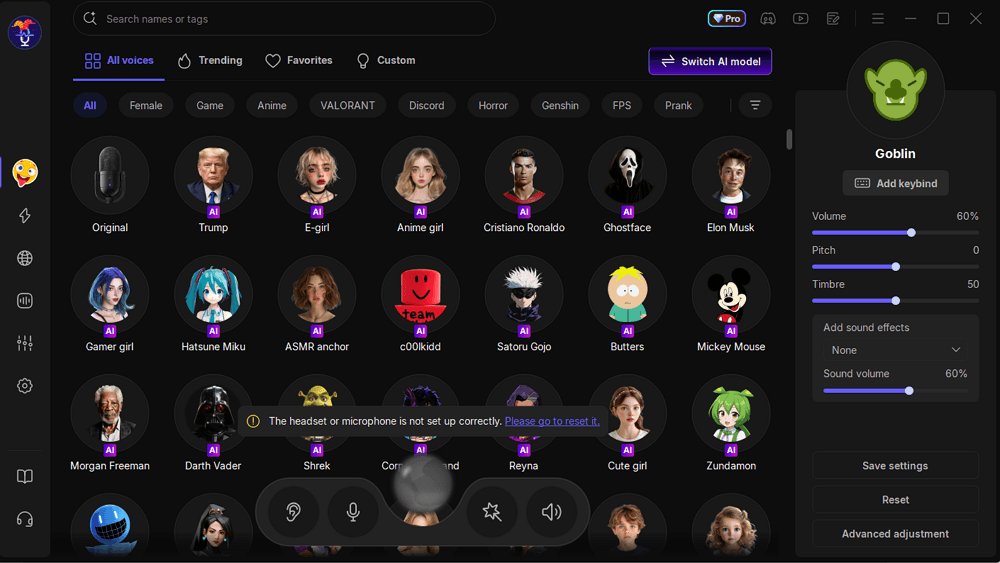
- 400+ AI Voices: Instantly sound like anime characters, celebrities, tactical military radios, robots, or RPG NPCs.
- Voice Cloning: Create a custom sound by cloning existing voices for a 100% unique profile.
- Massive Soundboard: Over 150,000 built-in sound effects ready to be hotkeyed for mid-match trolling or stream alerts.
- Universal Compatibility: Works natively with Discord, Valorant, Fortnite, CS2, Roblox, OBS, Twitch, WhatsApp, and Zoom.
The Best Voices for Trolling and Immersion
Whether you are trying to disguise yourself in a random lobby or completely immerse yourself in an RPG, the library is massive. Some of the most popular community favorites include:
- Ghostface: The iconic, terrifying voice from Scream—perfect for proximity chat in horror games.
- Tactical Radio: Adds static, compression, and radio clicks to your voice for total immersion in games like Battlefield or Squad.
- Anime Girl / Hatsune Miku: The ultimate voices for confusing your teammates in competitive matchmaking.
- Satoru Gojo: Channel your inner Jujutsu Kaisen character mid-fight.
- AI Assistant / Electronic: A heavily synthesized, robotic filter perfect for maintaining total anonymity.
Why You Need a Voice Changer in 2026
VoiceWave goes far beyond just “changing your voice for fun.” There are practical reasons why serious players use this Discord voice modifier.
1. The Ultimate Privacy Shield
Many players prefer not to reveal their real voices in toxic online lobbies. VoiceWave allows you to use a neutral AI voice to communicate comfortably, make callouts, and play as a team without exposing your identity.
2. Content Creation and Streaming
If you stream on Twitch or create content for YouTube and TikTok, high-quality audio routing is mandatory. Using the built-in soundboard and live voice-switching can elevate your content and generate clippable moments, which you can then link to your Rip Tweaks PC optimization guide to maximize your own channel’s growth.
3. Next-Level RPG Immersion
Playing GTA V Roleplay, Rust, or a tabletop RPG over Discord? You no longer have to fake an accent. Give your character a genuine, AI-driven voice in real-time.
How to Set Up VoiceWave in 3 Minutes
- Download & Install: Grab the free version of this AI voice changer for Windows 10/11 from the official EaseUS website.
- Select Your Output: Open VoiceWave, browse the library of 400+ voices, and test your microphone.
- Configure Your Game/App: Open the audio settings in Discord, Valorant, or OBS. Change your Input Device to
VoiceWave Virtual Microphone. - Adjust & Play: Map your favorite voices and soundboard effects to hotkeys.
Frequently Asked Questions
Is EaseUS VoiceWave safe to use?
Yes. As a globally recognized software company with 20+ years of experience, VoiceWave is secure and does not collect or sell your personal voice data.
Will this software get me banned in games?
VoiceWave acts as a virtual microphone, not a game-modifying script. It is safe for use in games like Valorant, Fortnite, and CS2.
Can I use this Discord voice modifier with OBS?
Absolutely. By selecting the VoiceWave Virtual Microphone as your input in OBS, you can stream your modified voice to your audience effortlessly.