
How to Fix "EA Javelin Anticheat Encountered an Error" in Battlefield 6 – 2026
"EA Javelin anticheat encountered an error" (often with error 94) means Javelin could not start the game or could not find the install folder. Repair the game in the EA app or verify it on Steam, reinstall EA Javelin Anticheat if needed, and close tools that clash with it.
EA Javelin Encountered an Error (94)
What causes EA Javelin Encountered an Error (94)
Javelin starts Battlefield 6 itself. It fails when game files are damaged or moved, when Javelin's own install is broken, or when an antivirus, overlay or macro tool blocks it.
How to fix EA Javelin Encountered an Error (94) in Windows
Repair the game and Javelin
Check the Javelin service
services.msc. Find the EA Javelin Anticheat service. If it is Disabled, set Startup type to Manual. Error 1053 means the service did not answer in time, which a clean restart usually fixes.Close tools that clash with the anti-cheat
Restart the PC (a real restart)
If it still does not work
Contact EA Help
Fix it in one click with RIP Tweaks (free)
RIP Tweaks 6.9.3 has a free anti-cheat error fixer. Open Fixes, then Anti-cheat errors, and paste EA Javelin Encountered an Error (94) or pick your game. The app first checks what your PC has right now (for example Secure Boot: Off, TPM: On) and shows only the steps still missing.
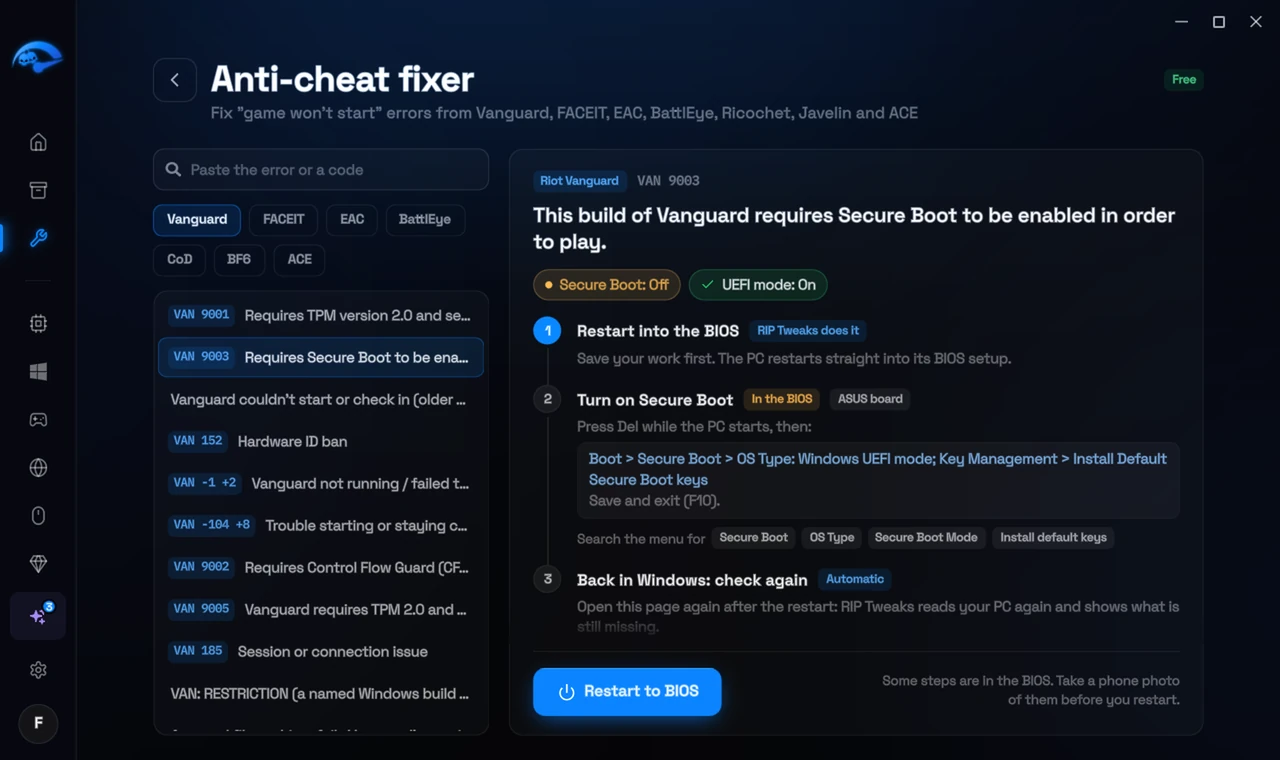
It fixes the Windows side itself
It takes you into the BIOS with the right card
It checks again after the restart
The fixer is free in every plan, also without an account. Download RIP Tweaks (free)
Check that it worked
Start Battlefield 6 from the EA app or Steam: Javelin starts and the game loads.
Frequently asked questions
I moved the game folder. Is that the cause?
Likely. Javelin looks for the game where it was installed. Use the launcher to locate or move the game, then repair.
Should I reinstall the game?
Usually not. These errors come from Windows or BIOS settings, so a reinstall changes nothing. Repairing the anti-cheat itself is enough when its files are damaged.
Can changing these settings get me banned?
No. These are the anti-cheat's own requirements, and the publisher asks you to change them. Bans come from cheats and tools that tamper with the game, never from turning on Windows security features.
Sources
- EA Help: Battlefield 6 error codes (checked 15 November 2026)
All anti-cheat errors: Anti-Cheat Error Fixes. Related: How to Fix EA Javelin Anticheat Error (7) (1053) in Battlefield 6 – 2026 and How to Fix "SecureBoot Is Not Enabled" in Battlefield 6 – 2026.