
How to Fix "Failed Attestation Status" in Call of Duty – 2026
"Failed Attestation Status" means the TPM attestation check did not pass, most often because of old firmware TPM versions. Update the BIOS first. If it continues, switch the firmware TPM off and on in the BIOS or clear it in Windows, and then contact Activision Support with the wizard result.
CoD: Failed Attestation Status
What causes CoD: Failed Attestation Status
Attestation proves to Activision that the PC started cleanly, signed by the TPM. Old fTPM or PTT firmware, a TPM that was reset, or an unusual boot chain can make it fail.
How to fix CoD: Failed Attestation Status in Windows
Check your TPM
tpm.msc and press Enter. The TPM is ready for use with Specification Version 2.0 is what you want. Compatible TPM cannot be found means the firmware TPM is switched off in the BIOS. Almost every AMD Ryzen CPU (fTPM) and Intel CPU of the last years (PTT) has one built in.Suspend BitLocker first (if it is on)
manage-bde -protectors -disable C: -RebootCount 2. It turns itself back on after two restarts. Check that you can see your recovery key at aka.ms/myrecoverykey before you go on.How to fix it in the BIOS
This part happens in your PC's firmware setup (the BIOS), so open this page on your phone first. Menu names change a little between BIOS versions: if a path below does not match, look for the words in bold.
Restart into the BIOS
shutdown /r /fw /t 0 in Terminal (Admin). You can also press Del right after switching the PC on (desktops; F2 on many laptops and some ASRock and MSI boards).Update the BIOS
Change these settings
- Switch the firmware TPM (fTPM or PTT) off, save and restart into the BIOS again, then switch it on again and save. This re-creates the TPM without clearing it from Windows.
Where to find them on your board:
ASUS
Firmware TPM off and on again: Advanced > AMD fTPM configuration > Firmware TPM (AMD), or Advanced > PCH-FW Configuration > PTT (Intel)
MSI
Firmware TPM off and on again: Settings > Security > Trusted Computing > Security Device Support: Enable, then AMD CPU fTPM or Intel PTT
Gigabyte (AORUS)
Firmware TPM off and on again: Settings > Miscellaneous > AMD CPU fTPM (AMD) or Intel Platform Trust Technology (PTT) (Intel)
ASRock
Firmware TPM off and on again: Advanced > CPU Configuration > AMD fTPM switch (AMD), or Security > Intel Platform Trust Technology (Intel)
Laptops and prebuilt PCs
HP: Esc then F10, Advanced > Secure Boot Configuration, Security > TPM Embedded Security, Advanced > System Options > Virtualization Technology.
Lenovo: F1 on ThinkPad, F2 or the Novo button on IdeaPad and Legion, Security > Secure Boot, Security > Security Chip, Security > Virtualization.
ASUS: F2, Security > Secure Boot Control, Advanced > Trusted Computing.
Acer: F2, set a Supervisor password first or Secure Boot stays greyed out, then Boot > Secure Boot and Security > TPM.
MSI: Del, Security > Secure Boot, Advanced > Trusted Computing.
Gigabyte / AORUS: F2, Security > Secure Boot, Advanced > Trusted Computing.
Save and restart
If it still does not work
Clear the TPM (last resort)
tpm.msc and choose Clear TPM, then confirm at the restart. Suspend BitLocker first and know your recovery key. Clearing the TPM removes your Windows Hello PIN and keys stored in the TPM, so you set the PIN up again afterwards.Contact Activision Support
Fix it in one click with RIP Tweaks (free)
RIP Tweaks 6.9.3 has a free anti-cheat error fixer. Open Fixes, then Anti-cheat errors, and paste CoD: Failed Attestation Status or pick your game. The app first checks what your PC has right now (for example Secure Boot: Off, TPM: On) and shows only the steps still missing.
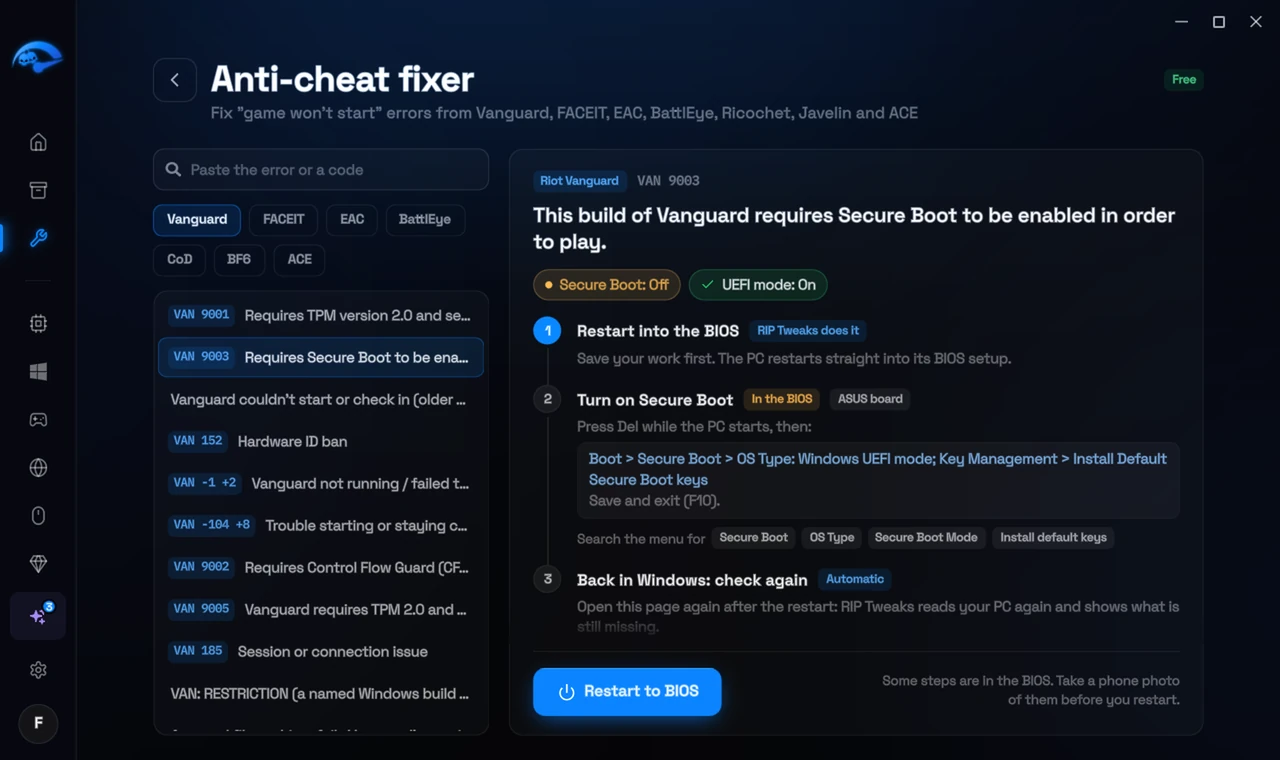
It fixes the Windows side itself
It takes you into the BIOS with the right card
It checks again after the restart
The fixer is free in every plan, also without an account. Download RIP Tweaks (free)
Check that it worked
Start Call of Duty: the Secure Attestation wizard shows every line as passed.
Frequently asked questions
Is a failed attestation a ban?
No. It is a check that did not pass on this PC. Fix it and the game lets you in.
Does turning on TPM delete anything?
No. Switching the firmware TPM on does not touch your files. Only clearing an existing TPM removes things stored in it, like the Windows Hello PIN and BitLocker keys, which is why you suspend BitLocker first.
My settings were gone after a BIOS update. Is that normal?
Yes. BIOS updates often reset every setting to the default, and on some boards that turns fTPM, Secure Boot or virtualization off again. Check them again after every BIOS update.
Can changing these settings get me banned?
No. These are the anti-cheat's own requirements, and the publisher asks you to change them. Bans come from cheats and tools that tamper with the game, never from turning on Windows security features.
Sources
- Activision Support: TPM 2.0 and Secure Boot for Call of Duty (updated 5 November 2026)
All anti-cheat errors: Anti-Cheat Error Fixes. Related: How to Fix "BIOS Firmware Update Required" in Call of Duty – 2026 and How to Fix "TPM 2.0: Not Enabled" in Call of Duty (BO7, Warzone) – 2026.