
How to Fix Easy Anti-Cheat "Untrusted System File" – 2026
Easy Anti-Cheat's "Untrusted system file" error names a file in C:\Windows\System32 whose signature Windows cannot confirm. Usually a tool replaced or patched a Windows file, or an update was interrupted. Repair Windows with DISM and SFC, install every update, and uninstall the tool that changed the file.
EAC: Untrusted System File
What causes EAC: Untrusted System File
EAC checks that the Windows files loaded into the game are Microsoft's originals. Theme patchers, "DLL fixes" downloaded from the web, some overlays, damaged updates and missing root certificates make a file look untrusted.
How to fix EAC: Untrusted System File in Windows
Repair Windows system files
DISM /Online /Cleanup-Image /RestoreHealth and wait until it finishes, then run sfc /scannow. Restart. This puts back any Microsoft file that was changed or damaged, using Microsoft's own copies.Install every Windows update
Sync the clock
services.msc and try again.Uninstall the tool that changed it
Fix it in one click with RIP Tweaks (free)
RIP Tweaks 6.9.3 has a free anti-cheat error fixer. Open Fixes, then Anti-cheat errors, and paste EAC: Untrusted System File or pick your game. The app first checks what your PC has right now (for example Secure Boot: Off, TPM: On) and shows only the steps still missing.
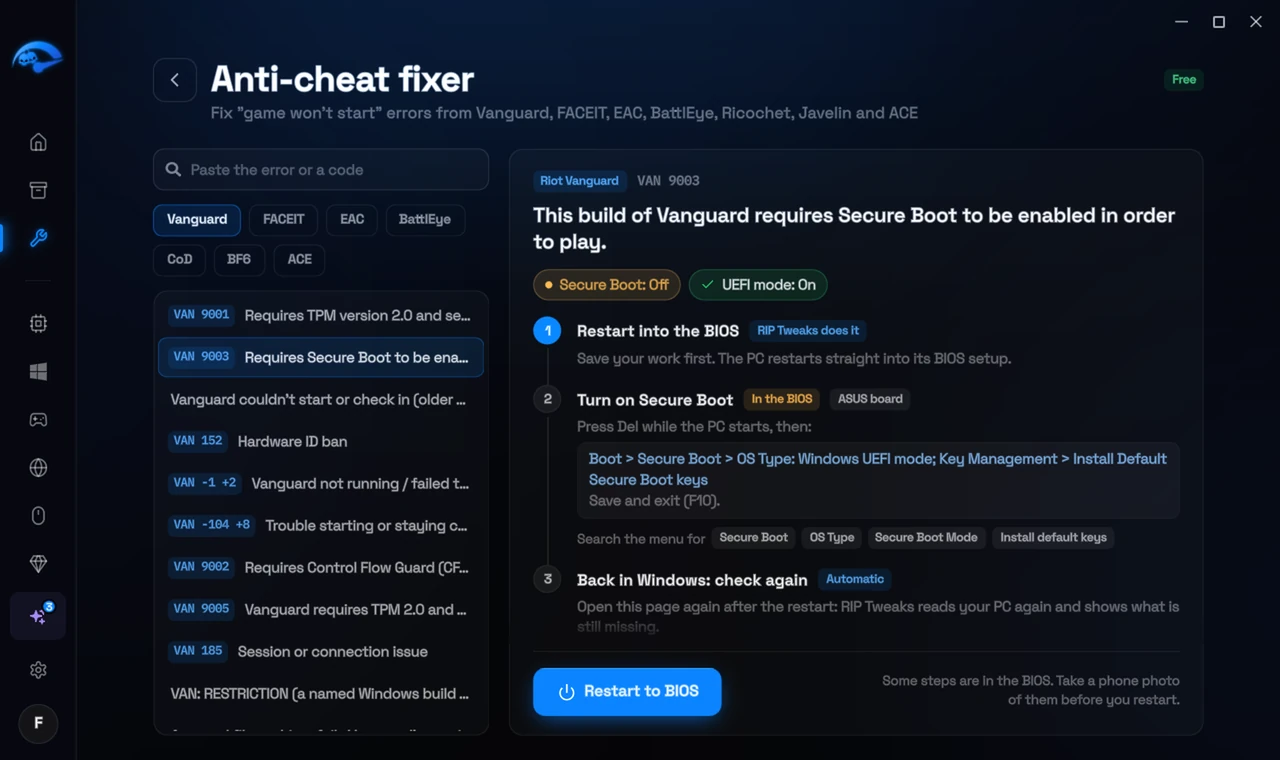
It fixes the Windows side itself
It takes you into the BIOS with the right card
It checks again after the restart
The fixer is free in every plan, also without an account. Download RIP Tweaks (free)
Check that it worked
Start the game. If a different file is named now, repeat the repairs.
Frequently asked questions
Should I download the named DLL from a website?
Never. DLL download sites are a common source of malware and of exactly this error. Let DISM and SFC put Microsoft's copy back.
SFC says it found problems it could not fix. What now?
Run DISM /RestoreHealth first (it needs internet), then SFC again. If it still fails, a repair install of Windows (keeping your files) fixes it.
Can changing these settings get me banned?
No. These are the anti-cheat's own requirements, and the publisher asks you to change them. Bans come from cheats and tools that tamper with the game, never from turning on Windows security features.
Sources
- Fatshark Support: How to resolve Easy Anti-Cheat errors (checked 15 November 2026)
All anti-cheat errors: Anti-Cheat Error Fixes. Related: How to Fix Easy Anti-Cheat Kernel Debugger or Test Signing Errors – 2026 and How to Fix FACEIT "Error Verifying Digital Signature" – 2026.