
How to Fix FACEIT "Incompatible Driver Detected" (NVMe, mtkwlex) – 2026
FACEIT's "Incompatible driver detected" usually names a storage or Wi-Fi driver, for example a vendor NVMe driver or MediaTek's mtkwlex, that does not work with IOMMU and DMA protection. Install the newest version of that driver, or switch the NVMe drive to the standard Microsoft driver, and restart.
FACEIT: Incompatible Driver Detected
What causes FACEIT: Incompatible Driver Detected
With IOMMU and Kernel DMA Protection on, Windows only allows drivers that support DMA remapping. Some older vendor NVMe drivers and MediaTek Wi-Fi drivers do not. FACEIT names the file so you know which one.
How to fix FACEIT: Incompatible Driver Detected in Windows
Update or switch the named driver
Install every Windows update
Restart the PC (a real restart)
Fix it in one click with RIP Tweaks (free)
RIP Tweaks 6.9.3 has a free anti-cheat error fixer. Open Fixes, then Anti-cheat errors, and paste FACEIT: Incompatible Driver Detected or pick your game. The app first checks what your PC has right now (for example Secure Boot: Off, TPM: On) and shows only the steps still missing.
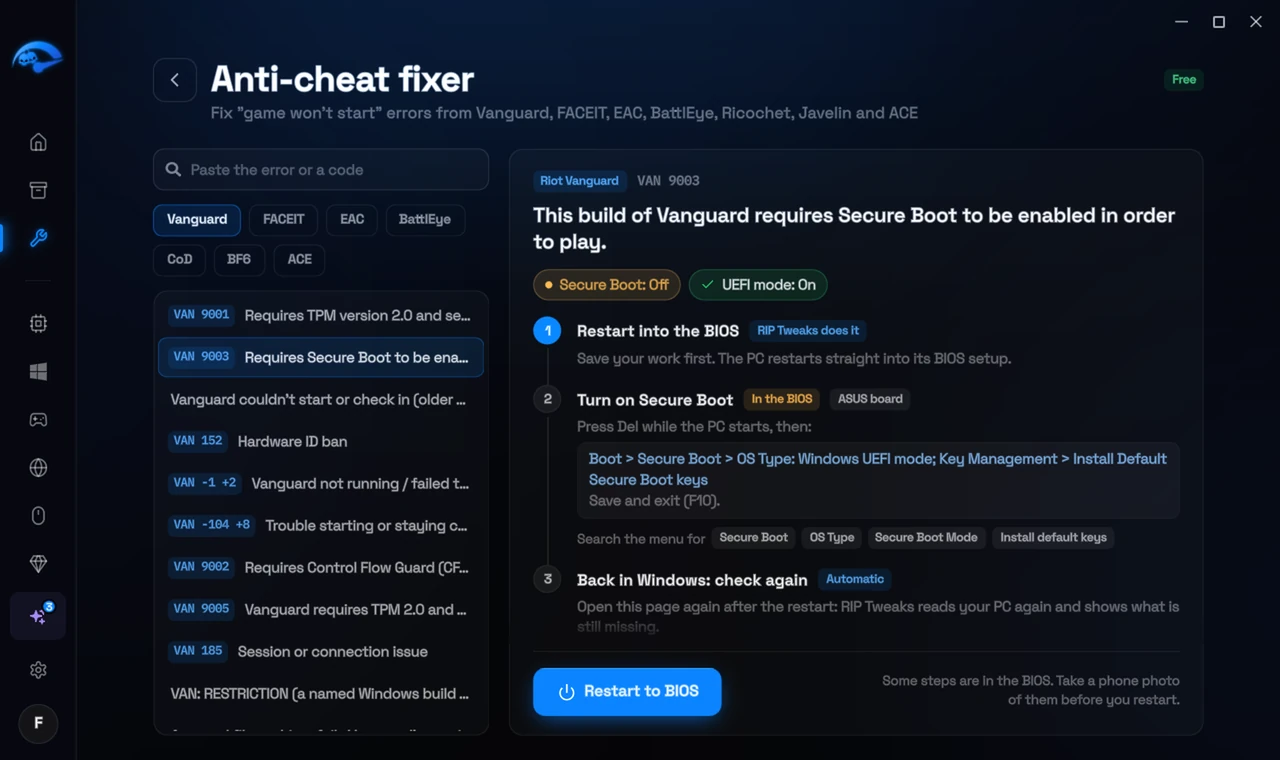
It fixes the Windows side itself
It takes you into the BIOS with the right card
It checks again after the restart
The fixer is free in every plan, also without an account. Download RIP Tweaks (free)
Check that it worked
Device Manager shows the new driver, and the FACEIT anti-cheat starts without the message.
Frequently asked questions
Is the Microsoft NVMe driver slower?
For gaming, no measurable difference on modern SSDs. Some vendor drivers add small benchmark gains only.
The driver is for my Wi-Fi. Can I use a cable instead?
Yes, as a quick test: disable the Wi-Fi adapter in Device Manager and use Ethernet. For a real fix, update the Wi-Fi driver.
Can changing these settings get me banned?
No. These are the anti-cheat's own requirements, and the publisher asks you to change them. Bans come from cheats and tools that tamper with the game, never from turning on Windows security features.
Sources
- FACEIT Support: Windows security requirements (checked 15 November 2026)
- FACEIT Support: CS2 anti-cheat measures (checked 15 November 2026)
All anti-cheat errors: Anti-Cheat Error Fixes. Related: How to Fix FACEIT "Please Enable IOMMU" – 2026 and How to Fix FACEIT "Forbidden Driver" (RTCore64, WinRing0x64) – 2026.