
How to Fix Easy Anti-Cheat Error 30005 (CreateFile Failed With 32) – 2026
Easy Anti-Cheat error 30005 means EAC could not start its driver. "CreateFile failed with 32" means EasyAntiCheat.sys is locked by another process, "CreateService failed with 1072" means an old EAC service is half removed, and "StartService failed with 1450" means Windows ran short of resources. A real restart fixes most cases; repair EAC if it does not.
EAC Error 30005
What causes EAC Error 30005
EAC copies its driver to EasyAntiCheat.sys and starts it as a service. Error 30005 appears when the file is still in use by an earlier start that did not end cleanly, when an antivirus scans or locks it, when the old service is marked for deletion (1072), or when Windows is low on system resources (1450).
How to fix EAC Error 30005 in Windows
Restart the PC (a real restart)
Repair Easy Anti-Cheat
If it says "failed with 32": delete the old driver file
Close tools that clash with the anti-cheat
Fix it in one click with RIP Tweaks (free)
RIP Tweaks 6.9.3 has a free anti-cheat error fixer. Open Fixes, then Anti-cheat errors, and paste EAC Error 30005 or pick your game. The app first checks what your PC has right now (for example Secure Boot: Off, TPM: On) and shows only the steps still missing.
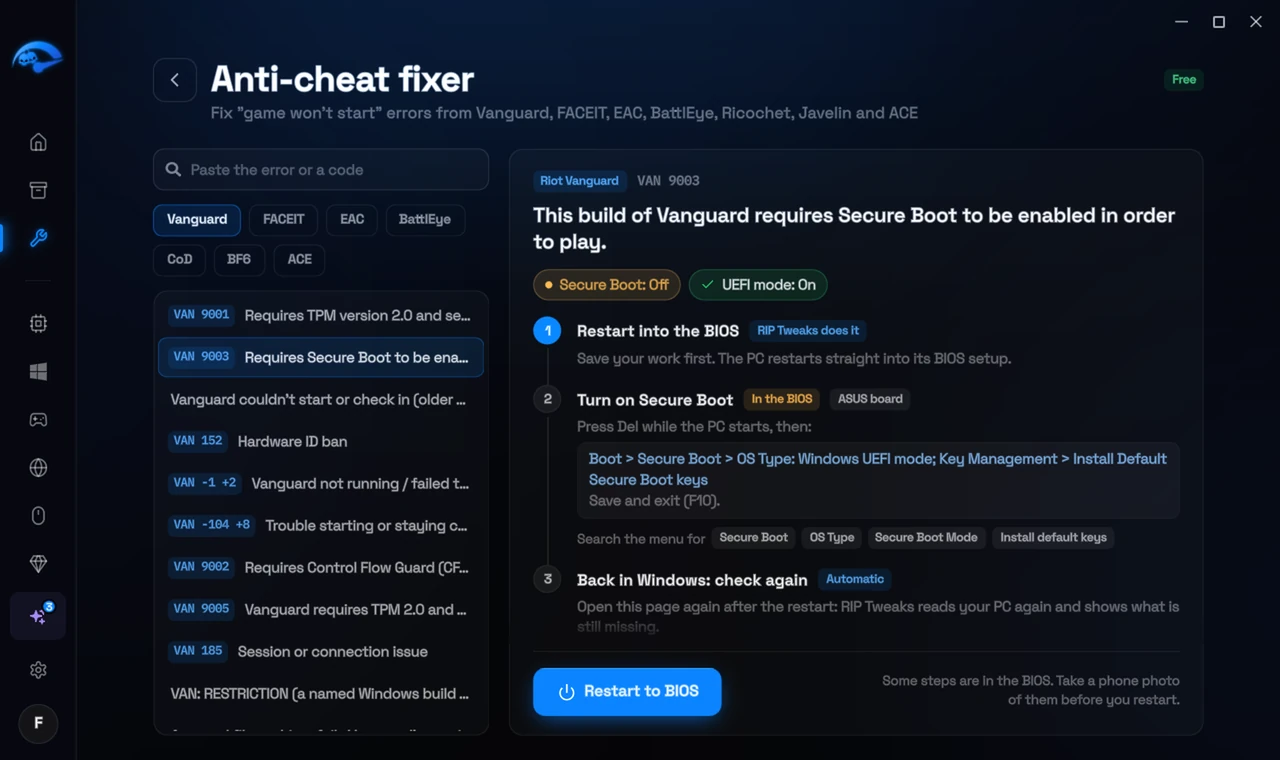
It fixes the Windows side itself
It takes you into the BIOS with the right card
It checks again after the restart
The fixer is free in every plan, also without an account. Download RIP Tweaks (free)
Check that it worked
Start the game: the Easy Anti-Cheat splash screen appears and the game loads.
Frequently asked questions
What do 32, 1072 and 1450 mean?
They are Windows error numbers: 32 = the file is in use, 1072 = the service is marked for deletion, 1450 = not enough system resources. All three need a restart first.
Does my antivirus cause error 30005?
It can, if it scans or locks EasyAntiCheat.sys at the moment EAC starts. Add the game folder and the EasyAntiCheat_EOS folder as exclusions.
Should I reinstall the game?
Usually not: repair the EAC service first and verify the files. A reinstall only helps when the game files themselves are damaged.
Can changing these settings get me banned?
No. These are the anti-cheat's own requirements, and the publisher asks you to change them. Bans come from cheats and tools that tamper with the game, never from turning on Windows security features.
Sources
- Fatshark Support: How to resolve Easy Anti-Cheat errors (checked 15 November 2026)
- Easy Anti-Cheat: support (checked 15 November 2026)
All anti-cheat errors: Anti-Cheat Error Fixes. Related: How to Fix "Easy Anti-Cheat Is Not Installed" – 2026 and How to Fix BattlEye "Driver Load Error (1450)" – 2026.