
Top 3 Free Voice Changers for Gaming: Which One Has No Paywall?

Written version of our video, every step checked against it.
Quick answer
- Our pick of the three free voice changers in the video is EaseUS VoiceWave: preset voices, AI voices, game voices, a soundboard and a Voice Lab in one free download.
- Start from Original, click any voice such as Old Man and fine-tune it with Pitch and Timbre on the right.
- AI voices like Trump, Elon Musk and Cristiano Ronaldo download with one click, and the list even has GTA V characters.
- The second app in the video puts voice editing and many voices behind a paywall. The third is free but manual, with only about 12 voices.
- For Fortnite, VALORANT, GTA V, Discord or OBS: keep Enable voice changer on and pick the VoiceWave Microphone as your input.
Looking for a voice changer for gaming that is really free, works in every game and doesn't lock the fun parts behind a paywall? In our video we tried three free voice changers on a Windows PC. This guide shows our top pick screen by screen, explains what held the other two back, and ends with the one input setting that makes your teammates hear the new voice in Fortnite, VALORANT, GTA V, Discord, OBS or Streamlabs.
The first app on the list, and the one the video calls the best and most realistic, is EaseUS VoiceWave. Download it for free from the link in the video description (or the button at the end of this page), install it and open it. It lands on the voices page.
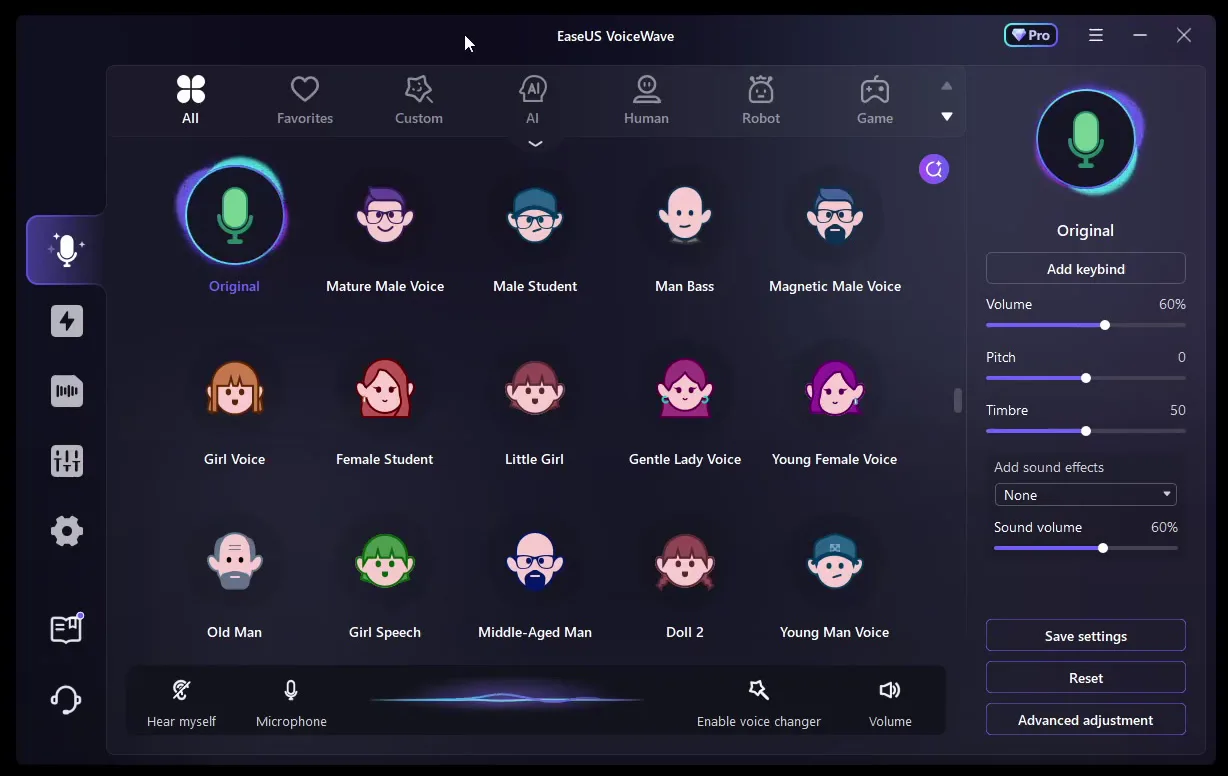
Here is what you see on that page:
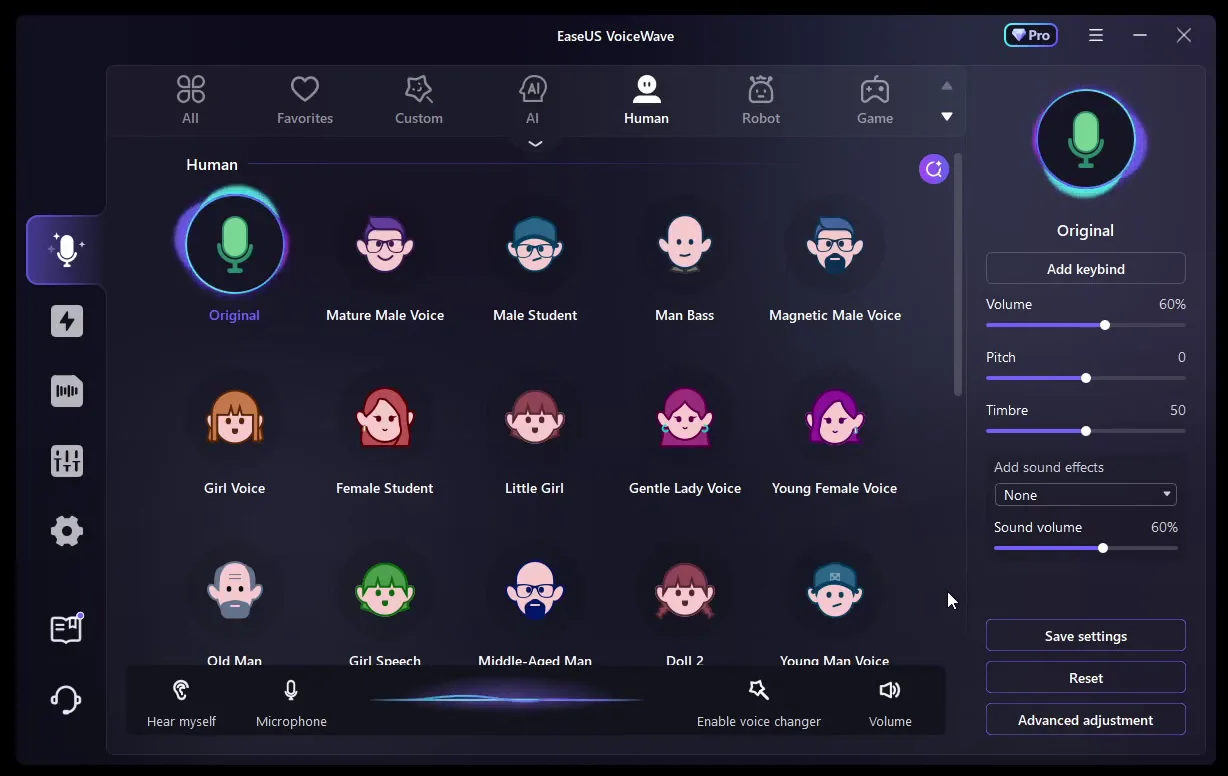
- Tabs at the top: All, Favorites, Custom, AI, Human, Robot and Game, so you can jump straight to one kind of voice.
- Original (the green microphone): your real voice, unchanged. It is the voice you compare every other one with.
- The panel on the right: Add keybind, Volume (60%), Pitch (0), Timbre (50), Add sound effects, Sound volume, and the Save settings, Reset and Advanced adjustment buttons.
- The bar at the bottom: Hear myself, Microphone, Enable voice changer and Volume.
Good to know
The video is from March 2025. Newer VoiceWave versions have a redesigned home page with Featured and Community tabs, but the voices, the soundboard and the microphone setup work the same way. Our 2026 VoiceWave guide shows the new layout.
Changing your voice is one click: select a voice and keep talking, the change happens live. The video goes from Original to a manlier voice, then to the voice of an old man, then to a lady voice. These preset voices need no download.
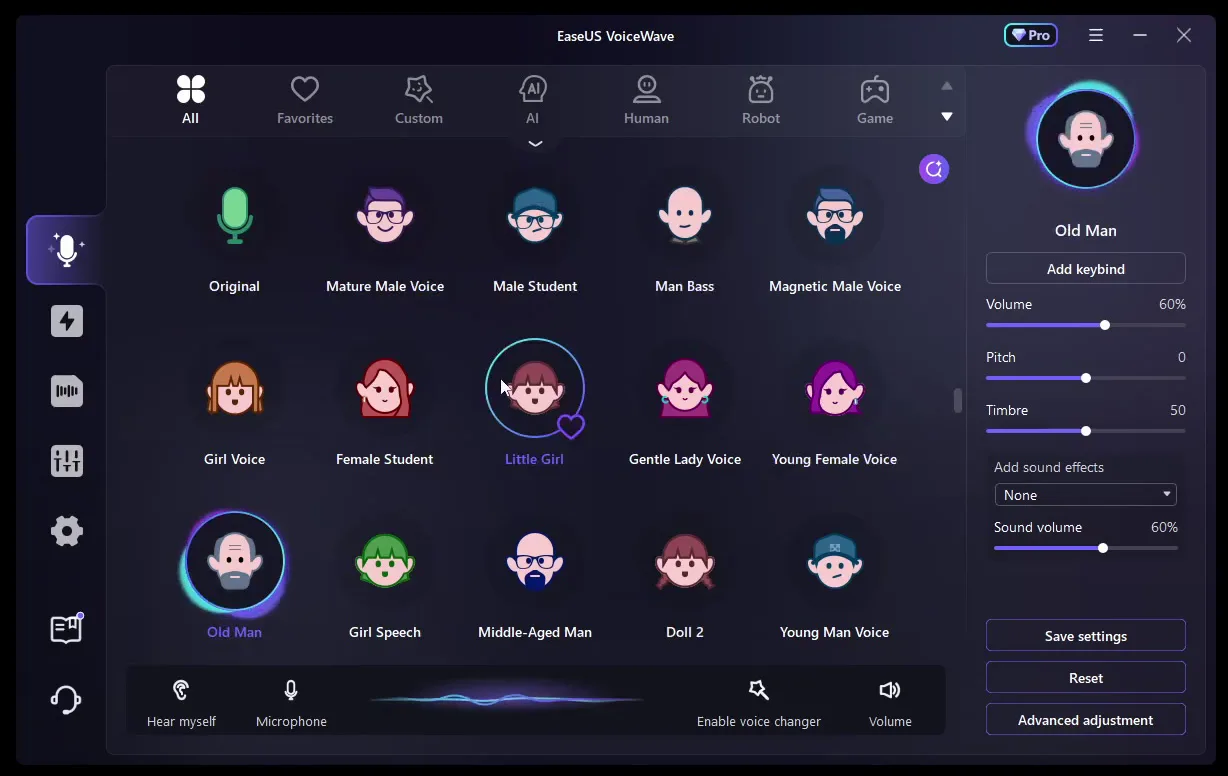
The presets sit in three rows. The first row is male (Mature Male Voice, Male Student, Man Bass, Magnetic Male Voice), the second is female (Girl Voice, Female Student, Little Girl, Gentle Lady Voice, Young Female Voice), and the third mixes Old Man, Girl Speech, Middle-Aged Man, Doll 2 and Young Man Voice. If a voice is close but not quite right, move Pitch (higher or lower) and Timbre (the colour of the voice) in the right panel, then click Save settings. Reset brings the defaults back.
Tip
Hover over a voice and a heart appears on it, as on Little Girl in the screenshot. Click it to add the voice to the Favorites tab, so the two or three voices you use in matches are always one click away.
Scroll down to the AI section (or open the AI tab). These voices sound like real people and characters, and they are what the video calls extremely good AI. Each one has an AI badge and a download arrow: the first click downloads the voice, after that it switches in one click like a preset.
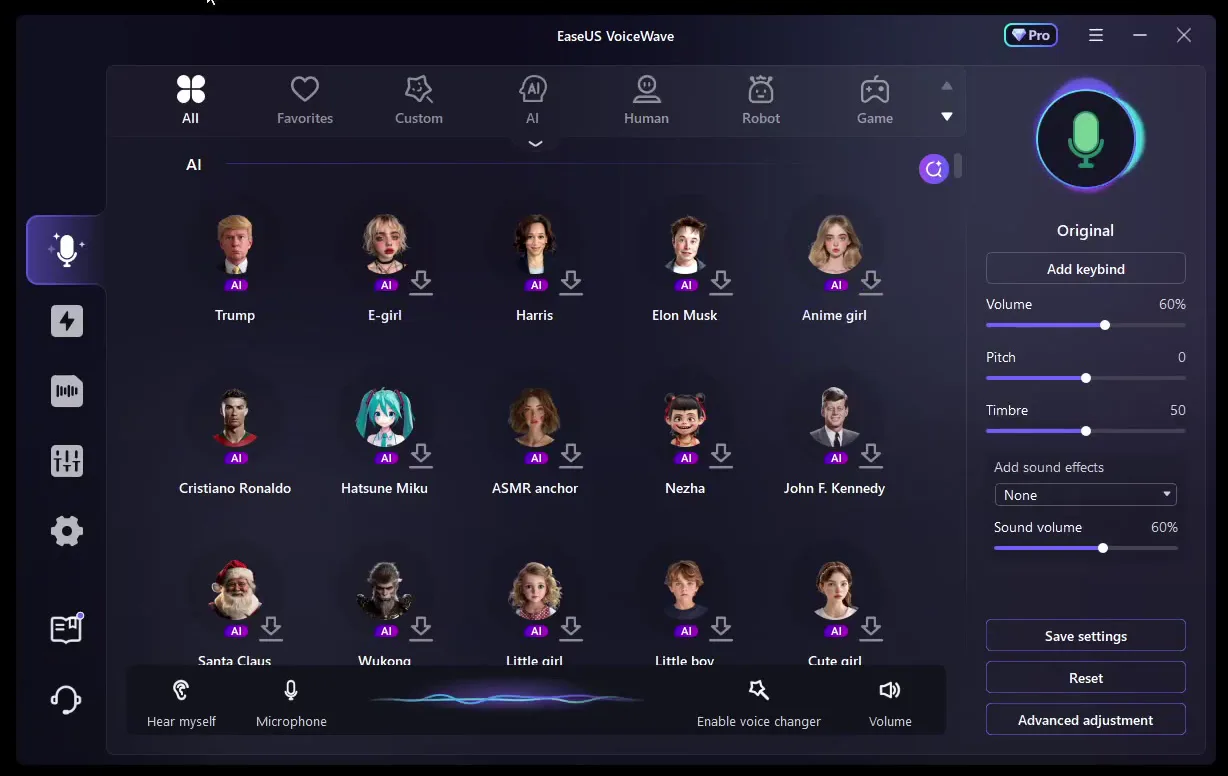
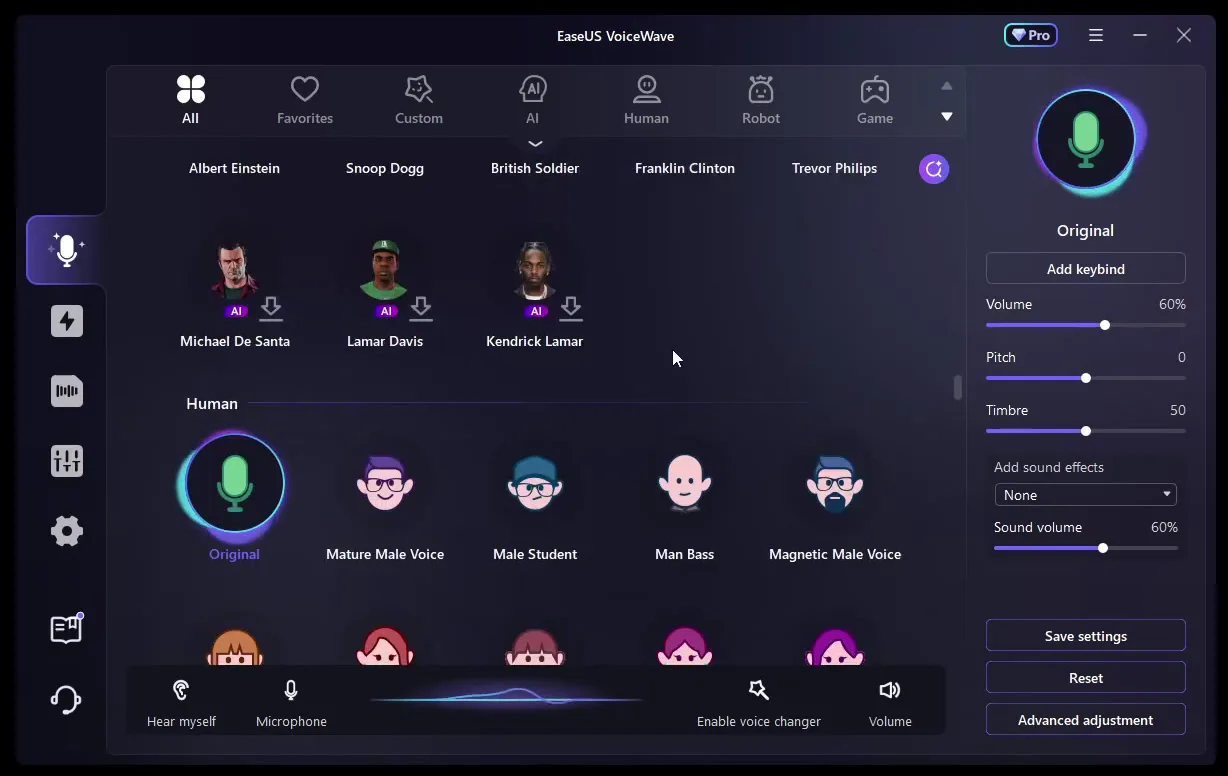
In the video, AI Trump promises to build a wall, and the voices it names are Trump, Kamala Harris, Elon Musk, Cristiano Ronaldo, John F. Kennedy and Santa Claus. The list on screen also has E-girl, Anime girl, Hatsune Miku, Wukong and more. For GTA V players the best find is near the end: Franklin Clinton, Trevor Philips, Michael De Santa and Lamar Davis, so you can talk like a GTA V character in the game itself.
VoiceWave also has character voices for games: in the video you hear a counter-terrorist, an ice king and a dragon. Next to the voices are two more tools.
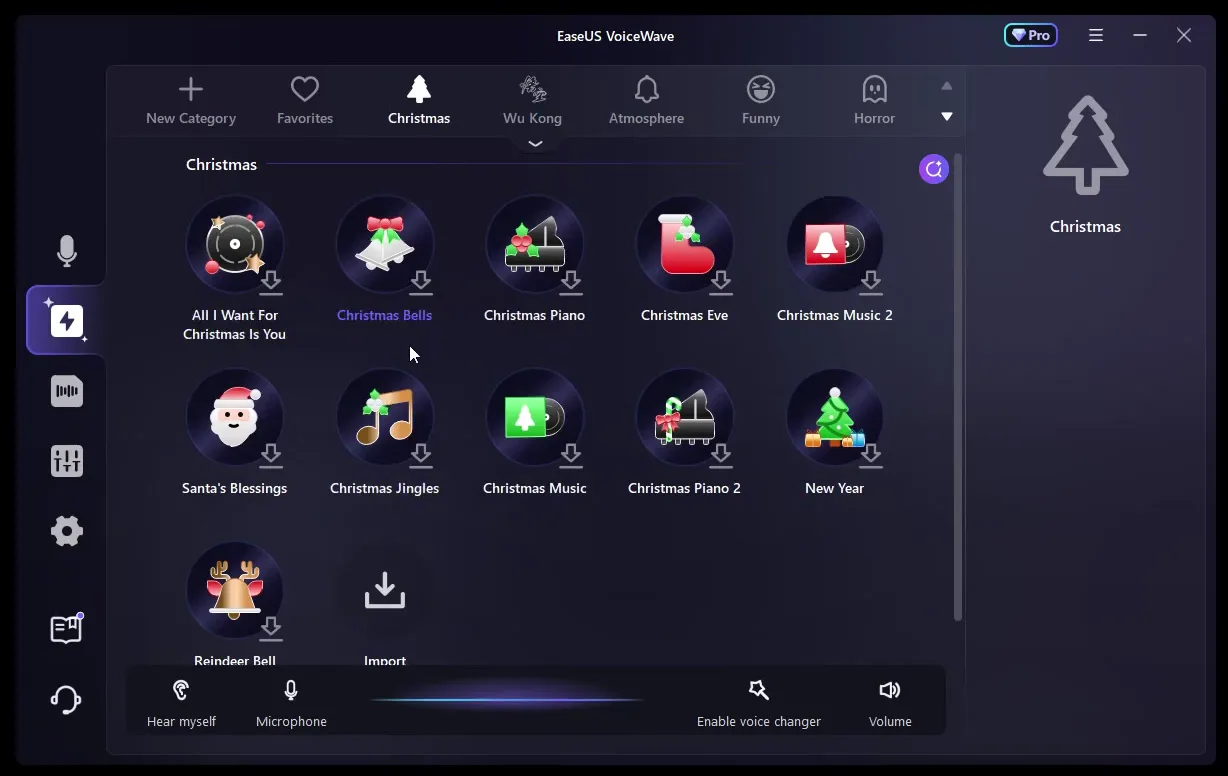
The soundboard (the lightning icon in the left sidebar) plays sounds on top of your voice. Its categories in the video are Christmas, Wu Kong, Atmosphere, Funny and Horror, plus Favorites and New Category for your own sets. Like AI voices, a sound downloads on its first click.
Lightning icon (soundboard)Category, e.g. ChristmasSound, e.g. Christmas Bells
The Voice Lab is where you build a custom voice yourself. The video adds distortion, which changes the voice audibly, and adjusts the delay, and calls the controls extremely easy to use. This is the kind of voice editing the second app in the video charges for.
Tip
Every soundboard category ends with an Import tile. Use it to add your own sound file, so your favourite meme sound sits next to the built-in ones.
The video says you can use VoiceWave in every game, naming Fortnite, VALORANT and GTA V, and in apps like OBS and Streamlabs. To make that work, VoiceWave has to stay open with Enable voice changer on in the bottom bar, and the game has to listen to the VoiceWave Microphone instead of your real one.
In Windows, right-click the speaker icon on the taskbar, open the sound settings and select VoiceWave Microphone under Input. Your real microphone stays plugged in: VoiceWave listens to it and passes the changed voice on.
SettingsSystemSoundInputVoiceWave Microphone
Careful
Apps that use one fixed microphone ignore the Windows default. In Fortnite (Audio, Voice Chat Input Device), VALORANT (Audio, Voice Chat, Input Device), Discord (Voice & Video) and OBS or Streamlabs (the Mic/Aux audio device), pick the VoiceWave Microphone there too.
What the other two free voice changers lacked
The video tests two more free apps, and their weak spots are a good checklist for any free voice changer you look at.
- App 2 (from 1:25): lots of fun voices (you can be a banana) and soundboards. The catch: editing your voices costs money, so do many of the other voices, and a lot of the app sits behind a paywall.
- App 3 (from 1:58): free, but it doesn't open when you click it. You right-click its tray icon, click Turn on, then Set voice changer. Everything is set by hand (an alien voice plus pitch, boost, sensitivity and bass), and there are only about 12 voices with a custom pitch.
So before you install any free voice changer, check four things: can you edit voices without paying, how many voices are free, does it have AI voices and a soundboard, and does it open and switch voices like a normal app. In the video, VoiceWave is the one that passes all four. For a longer ranking, see our top 5 voice changers for gaming.
How to check it worked
Test before you queue, not in the middle of a match:
- Click Hear myself in VoiceWave and speak: you hear the changed voice in your headphones.
- In the Windows sound settings, watch the input level bar under VoiceWave Microphone while you talk. If it moves, the changed voice reaches Windows.
- Join a Discord call or a party with a friend and ask what they hear. If it is your normal voice, the game or Discord still uses your real microphone directly.
- Streaming? Speak and watch the Mic/Aux meter in the OBS or Streamlabs audio mixer.
How to undo it
To sound like yourself again, click Original. To take VoiceWave out completely, select your real microphone again under Input in the Windows sound settings (and in any app you changed).
Key settings at a glance
FAQ
What is the best free voice changer for gaming?
Of the three free voice changers in the video, EaseUS VoiceWave comes first. It has preset, AI and game voices, a soundboard and a Voice Lab, and the video calls it extremely realistic and easy to use in any game.
Is there a free voice changer with no paywall?
In the video, the second app keeps voice editing and many voices behind a paywall. The third app is free but manual and has only about 12 voices. VoiceWave is a free download with its voices, soundboard and Voice Lab shown in the video; the app also shows a Pro badge, so check inside the app what your plan includes.
How do I use a voice changer in VALORANT?
Keep VoiceWave open with Enable voice changer on, then in VALORANT open Settings, Audio, Voice Chat and set the Input Device to VoiceWave Microphone. Pick your voice in VoiceWave before the match starts.
How do I use it in Fortnite?
Select VoiceWave Microphone as the Windows input or as the Voice Chat Input Device in Fortnite's Audio settings. Our Discord and Fortnite voice changer guide walks through it with screenshots.
Can I sound like a GTA V character?
Yes. The AI list in the video has Franklin Clinton, Trevor Philips, Michael De Santa and Lamar Davis. Download one, select it, and with the VoiceWave Microphone as your input you talk in GTA V with that voice.
Does it work with OBS and Streamlabs?
The video names both. In OBS or Streamlabs, set the Mic/Aux audio device to VoiceWave Microphone, and your stream gets the changed voice and your soundboard sounds.
How do I switch voices quickly during a game?
Use Add keybind in the right panel to put a voice on a key, and the heart to keep your main voices in Favorites. Our voice changer hotkey guide shows the keybind setup.
How do I go back to my normal voice?
Click Original, the first voice on the page. To stop using VoiceWave altogether, select your real microphone again under Input in the Windows sound settings.
Try EaseUS VoiceWave
EaseUS VoiceWave is the real-time voice changer used in the video. It works in Discord, games and streaming apps, and you can try it for free before you decide.
This article and the video are a paid partnership with EaseUS.